FREE PHOTO-TO-THREAD WORKFLOW
String Art Portrait Generator
Upload a portrait or try the example, adjust the preset, and generate your thread art directly on this page.
FREE PHOTO-TO-THREAD WORKFLOW
Create a Clear Portrait Pattern from Any Photo
Turn a clear face photo into a custom string art portrait. Upload your image, tune the pins and threads, preview the result, then export the artwork and nail connection data.
Runs in your browser. No account is required.
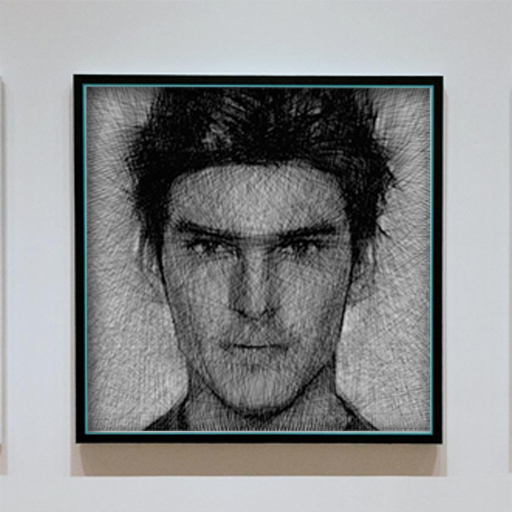
How to convert a photo to string art
Use a front-facing photo with one person, simple lighting, a plain background, and visible facial features. Crop close to the head and shoulders.
Open the generator, select the image, and choose a circle frame for a classic portrait composition or square for a full-frame crop.
Start with 250–350 pins and 4,000–7,000 threads. Add threads when the eyes or face outline look incomplete; reduce them if shadows become muddy.
Preview the photo conversion, then export a PNG, JSON technical data, or the TXT nail-to-nail connection sequence for construction.
Recommended portrait generator settings
These are practical starting points, not fixed rules. The amount of contrast and face detail in your source image matters more than image resolution alone.
| Portrait type | Pins | Threads | Tip |
|---|---|---|---|
| Simple silhouette | 180–250 | 2,500–4,000 | Keep the background white |
| Headshot | 250–350 | 4,000–7,000 | Prioritize eye and mouth contrast |
| Detailed portrait | 350–500 | 7,000–10,000 | Test a smaller run before building |
What makes a good source photo?
- ✓ Strong separation between the face and background
- ✓ Even lighting without blown-out highlights
- ✓ A crop that fills most of the frame
- ✓ Recognizable eyes, nose, mouth, and jaw line
What can you export?
- ✓ PNG preview for reference
- ✓ TXT connection steps for winding thread
- ✓ JSON pin and line data for technical reuse
- ✓ Circle or square frame layouts
Portrait string art FAQ
Is the portrait generator free?
Yes. The browser-based generator can create and export a portrait pattern without an account.
Does it convert any photo into string art?
It accepts common image files, but high-contrast single-person portraits usually produce clearer physical designs than busy group photos or low-light images.
Can I get numbered instructions?
Yes. After generation, export the TXT steps to get the ordered nail-to-nail connections. See the step-by-step generator guide.
Ready to turn your photo into thread art?
Start with the recommended settings, preview the portrait, and adjust until the important facial details read clearly.
Use the Portrait Generator Above